 Loading... Please wait...


 Euro
Euro
 My Account
 Cart
Cart 


Categories
- LED Projector Lights
- Car Truck & Motorcycle Bulbs
- Headlight Bulb
- H1 Bulb (55w)
- H2 Bulb (55W)
- H3 (55w)
- H4 (60-55w)
- H7 Bulbs (55w)
- H8 Bulb (35w)
- H9 (65w)
- H10 (42w)
- H11 Bulb (55w)
- H12 (53W)
- H13 (60-55w)
- H15 (55-15w)
- H16 (19W)
- H18 (65W)
- H19 (60-55W)
- 9004/HB2 (65-45w)
- 9005/HB3 (65w)
- 9005XS/HB3A (65w)
- 9006/HB4 (55w)
- 9006XS/HB4A (55w)
- 9007/HB5 (65w-55w)
- 9011 HIR1 (65w)
- 9012 HIR2 55w
- 880 / 881 (H27)
- Socket Bulbs
- Wedge Bulb
- Bayonet
- Motorcycle & ATV Bulbs
- Festoon
- Specialist Bulbs
- Hids-Direct Sale
- Headlight Bulb
- Air Suspension
- Accessories
- OEM Parts
- Motorbikes
- LED
- HID Kits
- HID Kits By Bulb Type
- H1 HID Kits
- H3 HID Kits
- H4 HID Kits
- H7 HID Kits
- H7R HID Kits
- H8 HID Kits
- H9 HID Kits
- H10 HID Kits
- H11 HID Kits
- H13 HID Kits
- H15 HID Kits
- H16 HID Kits
- 9004 / HB2 HID Kits
- 9005 / HB3 HID Kits
- 9006 / HB4 HID Kits
- 9007 / HB5 HID Kits
- 9012 / HIR2 HID Kits
- D1S / D1R HID Kits
- D2S / D2R HID Kits
- D3S / D3R HID Kits
- D4S / D4R HID Kits
- HID Kits By Vehicle Type
- HID Specialist
- HID Kits By Watts (W)
- HID Accessories
- HID Kits By Bulb Type
- OEM
- HID Xenon Bulbs
- MTEC
- Manufacturer
- ALFA ROMEO
- AUDI
- A1
- A2
- A3
- A3 ( W/ foglights )
- A3 Cabriolet
- A3 HID
- A3 Sportsback
- A3 Sportsback HID
- A4
- A4 Allroad Quattro
- A4 Allroad Quattro HID
- A4 Avant
- A4 Avant HID
- A4 HID
- A5
- A5 Sportsback
- A5 Sportsback HID
- A6
- A6 Allroad HID
- A6 Allroad Quattro
- A6 Avant
- A6 Avant HID
- A6 HID
- A7 Quattro HID
- A8
- A8 HID
- Q5
- Q5 HID
- Q7
- Q7 HID
- Quattro (Coupe)
- R8
- S3 Quattro
- S3 Sportsback
- S4 Quattro
- S4 Quattro HID
- S5 (Quattro)
- S5 Convertible
- S5 Convertible HID
- S5 HID (Quattro)
- TT (inc Quattro)
- TT Coupe
- TT HID
- TT Roadster
- TT Roadster HID
- BMW
- 1 Series F20
- 1 Series F20 HID
- 1 Series Cab E88
- 1 Series Cab HID E88
- 1 Series Coupe E82
- 1 Series Coupe HID E82
- 1 Series Sport hatch E81/E87
- 1 Series Sport hatch HID
- 3 Series COMPACT
- 3 Series Compact HID
- 3 Series Convertible
- 3 Series Convertible HID
- 3 Series Coupe
- 3 Series Coupe HID
- 3 Series Saloon
- 3 Series Saloon HID
- 3 Series Touring
- 3 Series Touring HID
- 5 Series
- 5 Series F10
- 5 Series F10 HID
- 5 Series F11 (touring)
- 5 Series F11 HID
- 5 Series HID
- 5 Series Saloon
- 5 Series Saloon HID
- 5 Series Touring
- 5 Series Touring HID
- 6 Series
- 7 Series
- 7 Series F01 F02 F04
- 7 Series HID
- 850i
- M5
- M5 HID
- X1 (E84)
- X1 (E84) HID
- X3
- X3 HID
- X5
- X5 HID
- X6
- Z3
- Z3M
- Z4
- Z8 HID
- CHRYSLER\JEEP
- CITROEN
- DAEWOO
- DAIHATSU
- FIAT
- 500
- 500 C
- 500 C HID
- 500 HID
- BARCHETTA
- BRAVA
- BRAVO
- BRAVO HID
- CINQUECENTO
- COUPE
- CROMA
- CROMA HID
- DOBLO
- DUCATO
- GRAND PUNTO
- IDEA
- LINEA
- MAREA
- MAREA WEEKEND
- MULTI WAGGON
- MULTIPLA
- PANDA
- PUNTO
- PUNTO EVO
- QUBO
- SEDIC
- SIECENTO
- SKUDO
- STILO
- STILO MULTI WAGGON
- STILO MULTI WAGGON HID
- STRADA
- TEMPRA 1.8 MUTI WAGGON 5
- TIPO
- ULYSSE 2.0S, EL 1,9 TD, S, TDEL
- ULYSSE 2.0S, EL 2.0 JTD
- ULYSSE 2.0S, EL 2.0 JTD HID
- UNO
- FORD
- CMAX
- COUGAR
- COURIER
- ESCORT
- ESCORT (ESTATE)
- ESCORT (HATCHBACK/SALOON)
- ESCORT (SPORT GL GHIA)
- ESCORT EST
- ESCORT MEXICO RS 2000
- ESCORT VAN
- ESCORT VAN MK IV
- EXPLORER
- FIESTA
- FIESTA XR2i
- FOCUS
- FOCUS C MAX
- FOCUS CMAX HID
- FUSION
- GALAXY
- GALAXY GHIA
- KA
- KUGA, ZETEC & TITANIUM
- MAVERICK
- MONDEO
- MONDEO HID
- MONDEO ZETEC/TITANIUM
- ORION 1.3, 1.4, 1.6,1.8D
- PROBE
- PUMA
- RANGER
- S-MAX
- SCORPIO
- SIERRA 1.6,2.0
- SIERRA 1.8 TURBO D
- SIERRA 2.0 RX4i
- SIERRA RS COSWORTH
- STREET KA
- TRANSIT
- HONDA
- HYUNDAI
- ISUZU
- JAGUAR
- KIA
- LAND ROVER
- LEXUS
- LOTUS
- MAZDA
- MERCEDES
- 190 (E, D)
- 300SE SEL
- 400SE SEL
- 500SE SEL
- 600SE SEL
- A CLASS
- A CLASS HID
- B CLASS
- B CLASS HID
- C CLASS
- C CLASS HID
- CLC
- CLC HID
- CLK
- CLK CAB
- CLK CAB HID
- CLK HID
- CLS
- E CLASS
- E Class (200,230,250D,300,320,420,500,560) HID
- E Class HID
- ECLASS (200, 220, 250, 350 CDI/CGI, 350 4-MATIC)
- G CLASS
- GL-CLASS
- GLK CLASS
- M 4x4 HID
- M CLASS
- ML
- ML HID
- R CLASS (AMG)
- R CLASS (AMG) HID
- S CLASS
- SL 600
- SL CLASS HID
- SLK
- SLK HID
- SLK ROADSTER
- SLR COUPE HID
- SPRINTER
- V CLASS
- VITO
- MG ROVER
- MINI
- MITSUBISHI
- NISSAN
- PORSCHE
- PEUGEOT
- 106
- 107
- 206
- 206 CC
- 206 TWINHEADLAMP
- 207
- 207 CC
- 3008
- 3008 HID
- 306
- 306 EST TWINHEADLAMP
- 306 SEDAN
- 306 TWINHEADLAMP
- 307
- 307 CC
- 307 FACELIFT
- 308
- 308 CC
- 308 CC HID
- 308 HID
- 4007
- 4007 HID
- 406
- 407 HID
- 407 SALOON
- 407 SALOON HID
- 407 SW
- 407 SW HID
- 5008
- 5008 HID
- 605
- 607
- 607 HID
- 806
- 807
- BIPPER
- BOXER
- EXPERT
- PARTNER
- RENAULT
- CLIO
- CLIO SPORT V6
- CLIO TWINHEADLAMP
- ESPACE
- ESPACE HID
- EXTRA VAN
- GRAND SCENIC II
- GRAND SCENIC III
- GRAND SCENIC III HID
- KANGOO
- LAGUNA
- LAGUNA COUPE
- LAGUNA COUPE HID
- LAGUNA HID
- MEGANE
- MEGANE HID
- MEGANE SCENIC
- MEGANE SCENIC HID
- MEGANE SCENIC RX4
- MODUS
- MODUS HID
- SAFRANE
- SAFRANE HID
- SCENIC
- SCENIC HID
- TWINGO
- ROVER
- SAAB
- SEAT
- SKODA
- SMART
- SSANGYONG
- SUBARU
- SUZUKI
- TOYOTA
- VAUXHALL
- VOLVO
- VW
- BEETLE
- BEETLE HID
- BORA
- CORRADO
- EOS
- EOS HID
- FOX
- GOLF MK4
- GOLF MK4 HID
- GOLF MK5
- GOLF MK5 HID
- GOLF MK6
- GOLF MK6 HID
- JETTA
- JETTA HID
- LUPO
- MULTIVAN
- MULTIVAN TWIN HEADLAMP
- PASSAT
- PASSAT CC
- PASSAT CC HID
- PHAETON
- POLO
- POLO HID
- POLO TWIN HEADLAMP
- SANTANA
- SCIROCCO
- SCIROCCO HID
- SHARAN
- TIGUAN
- TIGUAN HID
- TOUAREG
- TOUAREG HID
- TOURAN
- TOURAN HID
- TRANSPORTER (Single Headlight)
- TRANSPORTER (Twin Headlight)
- UP!
- VENTO
- VENTO TWIN HEADLAMP
Brands

- Home
- Installation Help
- BMW F30 F31 F35 LCI RGBW DRL Installation & User Guide
BMW F30 F31 F35 LCI RGBW DRL Installation & User Guide
BMW F30 F31 F35 LCI RGBW DRL Installation & User Guide
Installation, compatibility and operating guidance for the HIDS-DIRECT BMW F30 / F31 / F35 LCI RGBW Angel Eye DRL LED Conversion Kit, compatible with selected factory Full LED headlights using OE references 63117419610 and 63117419615.
BMW F30 F31 F35 LCI RGBW Angel Eye DRL LED Conversion Kit
OE References: 63117419610 / 63117419615
Vehicle Compatibility
This conversion kit is intended for compatible BMW 3 Series LCI vehicles fitted with factory Full LED headlights.
- BMW 3 Series F30 LCI - Saloon
- BMW 3 Series F31 LCI - Touring / Estate
- BMW 3 Series F35 LCI - Long-Wheelbase Saloon
BMW used different LED module and headlight configurations across these models. Before installation, compare your original LED boards, connectors and OE reference numbers with 63117419610 / 63117419615. If you are unsure, please contact HIDS-DIRECT with clear photographs of your original modules.
What's Included
- 6 x RGBW LED boards - complete set for both headlights
- RGBW control unit
- Vehicle connection harness
- Pre-terminated LED wiring loom
Installation Overview
- Access the headlight units following the appropriate BMW workshop procedure.
- Remove the original LED boards from the compatible Full LED headlights.
- Install the RGBW replacement boards using the original mounting locations and connectors.
- Connect the supplied wiring loom and RGBW controller.
- Refit the headlights and test white mode, colour selection and lighting functions before completing installation.
Headlight removal and LED-board replacement require technical work. We recommend installation by a suitably qualified automotive lighting technician. Installation requirements may vary according to vehicle and headlight specification.
Smartphone App Control
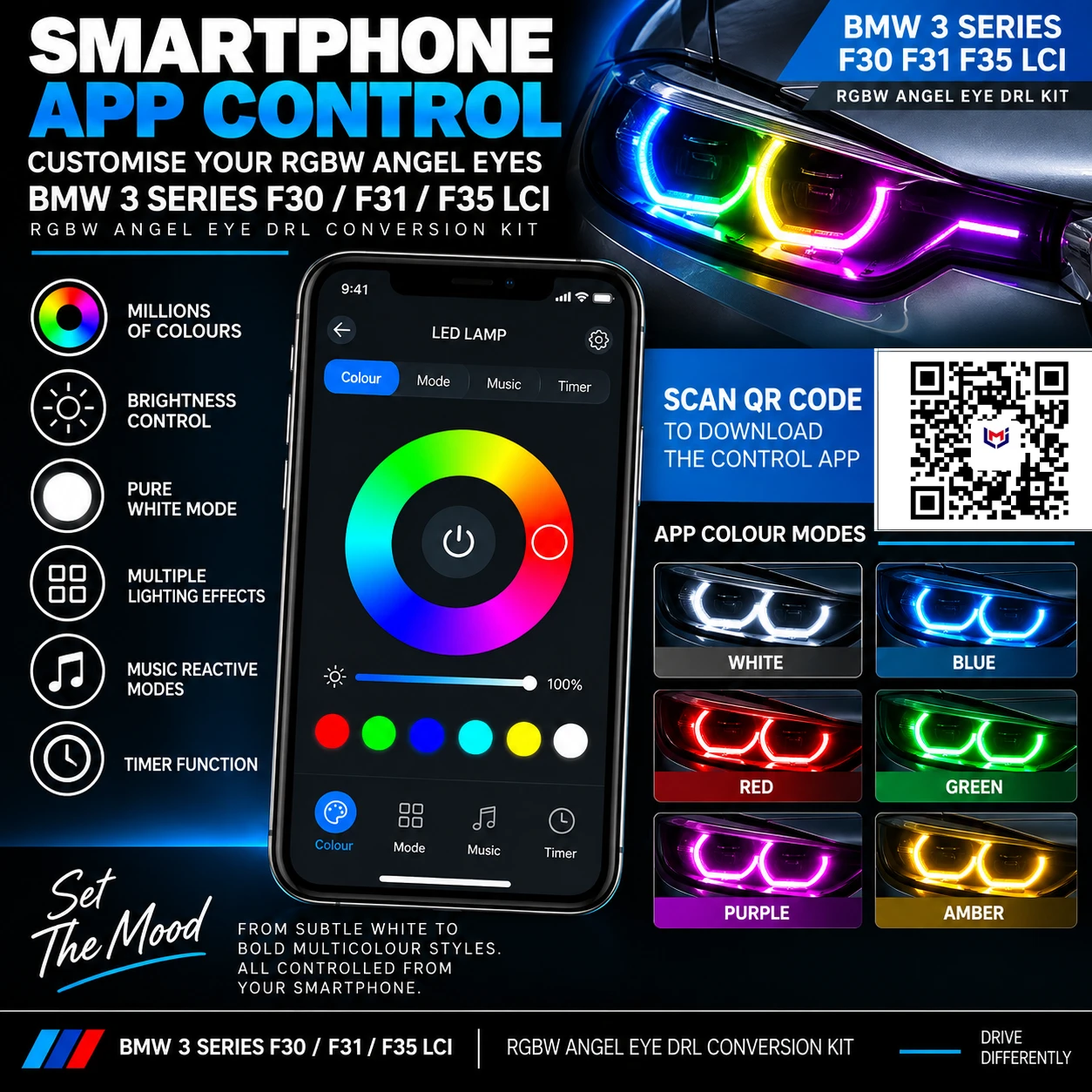
The RGBW controller is operated using a compatible smartphone app. The app provides colour selection, brightness adjustment, white mode, lighting effects, music-reactive functions and timer controls.
No printed app instructions are supplied with the kit. Scan the QR code in the image below using your smartphone to download the RGBW control app.
Using White & Colour Modes
The RGBW system includes a dedicated white DRL mode as well as a wide range of selectable RGB colours and lighting effects.
For normal road use, operate the system in its white DRL mode. Coloured lighting modes are intended for show, display, off-road or private-property use where permitted. The vehicle owner or driver is responsible for ensuring that the lighting configuration used complies with applicable road-vehicle lighting regulations.
Troubleshooting
One or more DRL sections do not illuminate
Check that each RGBW LED board connector is fully seated and inspect the wiring loom connections before assuming an LED board is faulty.
The controller does not operate
Check the vehicle-side harness connection and all controller plugs. Ensure connectors are fully locked into position.
The smartphone app cannot find the controller
Confirm that the correct app has been installed using the QR code above, switch the lighting system on and retry the connection from close range.
The displayed colour is incorrect
Check all LED-board and controller connections and verify the selected colour within the app.
Download the Full Installation & User Guide
Download the complete HIDS-DIRECT PDF guide for installation, app setup, operating guidance and troubleshooting.
Download Installation & User Guide (PDF)
Need Help?
If you are unsure about compatibility or installation, please contact HIDS-DIRECT before fitting. For compatibility enquiries, include your BMW model, year, headlight type and clear photographs of the original LED boards and connectors.






Quick Links
Support
Subscribe For Newsletter
Sign up for our newsletter and receive updates and special offers!

All prices are in GBP © 2026 HIDS DIRECT Store. All rights Reserved | Sitemap
hids-direct.co.uk, Car Part Hut Ltd, UK Registered 13039569 VAT Number GB 365025020
Registered office 140 LEE LANE BL6 7AF HORWICH GB